![[WPF] RadioButton 사용하기](https://3001ssw.com/wp-content/uploads/2026/01/blog_main_banner4.png)
이번 글에서는 WPF에서 RadioButton에 대해 알아보겠습니다. RadioButton는 IValueConverter에 대한 코드도 들어있으니 해당 글을 먼저 보시는 것을 추천 드립니다.
RadioButton 만들어보기
우선 아래와 같이 3개의 과일을 표시하는 RadioButton을 만들어 줍니다.
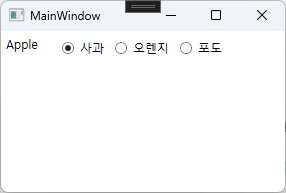
TextBlock은 현재 선택한 과일을 표시하는 역할을 하며, 각 RadioButton은 사과, 오렌지, 포도를 의미합니다. xaml 파일에 아래와 같이 입력해줍니다.
<Window x:Class="WpfRadioButton.MainWindow"
        xmlns="http://schemas.microsoft.com/winfx/2006/xaml/presentation"
        xmlns:x="http://schemas.microsoft.com/winfx/2006/xaml"
        xmlns:d="http://schemas.microsoft.com/expression/blend/2008"
        xmlns:mc="http://schemas.openxmlformats.org/markup-compatibility/2006"
        xmlns:local="clr-namespace:WpfRadioButton"
        mc:Ignorable="d"
        Title="MainWindow"
        Height="200"
        Width="300">
    <!--#region MainViewModel-->
    <Window.DataContext>
        <local:MainViewModel/>
    </Window.DataContext>
    <!--#endregion-->

    <!--#region Converter-->
    <Window.Resources>
        <local:FruitEnumToBoolConverter x:Key="FruitEnumToBoolConverter"/>
    </Window.Resources>
    <!--#endregion-->
    <StackPanel Orientation="Horizontal"
                Margin="5">

        <!--#region 선택한 라디오버튼 값 표시-->
        <TextBlock Text="{Binding SelectedFruit}"
                   Width="50"/>
        <!--#endregion-->

        <!--#region 라디오 버튼-->
        <RadioButton GroupName="Fruit"
                     Content="사과"
                     Margin="5"
                     IsChecked="{Binding SelectedFruit, Converter={StaticResource FruitEnumToBoolConverter}, ConverterParameter=Apple}"/>
        <RadioButton GroupName="Fruit"
                     Content="오렌지"
                     Margin="5"
                     IsChecked="{Binding SelectedFruit, Converter={StaticResource FruitEnumToBoolConverter}, ConverterParameter=Orange}"/>
        <RadioButton GroupName="Fruit"
                     Content="포도"
                     Margin="5"
                     IsChecked="{Binding SelectedFruit, Converter={StaticResource FruitEnumToBoolConverter}, ConverterParameter=Grape}"/>
        <!--#endregion-->
    </StackPanel>
</Window>
GroupName은 라디오 버튼끼리 같은 그룹을 정해주는 것입니다. GroupName을 지정해줘야 같은 GroupName을 가진 라디오 버튼 중 하나만 선택이 됩니다. 저는 세 개의 RadioButton에 GroupName에 Fruit을 입력하였습니다.
그 다음 IsChecked에 SelectedFruit을 바인딩 하였습니다. 그리고 Converter로 FruitEnumToBoolConverter를 입력하였고 ConverterParameter로 각각 값을 입력 하였습니다.
먼저 Converter 코드부터 알아보겠습니다. 아래는 FruitEnumToBoolConverter입니다.
public class FruitEnumToBoolConverter : IValueConverter
{
    public enum FruitType { Apple, Orange, Grape };
    public object Convert(object value, Type targetType, object parameter, CultureInfo culture)
    {
        if (value is FruitType type)
        {
            if (type.ToString() == parameter.ToString())
                return true;
            else
                return false;
        }
        return Binding.DoNothing;
    }

    public object ConvertBack(object value, Type targetType, object parameter, CultureInfo culture)
    {
        if (value is bool check)
        {
            if (check)
                return parameter;
            else
                return Binding.DoNothing;
        }
        return Binding.DoNothing;
    }
}
xaml에 입력된 ConverterParameter에 입력된 값들과 Converter에 선언된 FruitType enum 값은 문자 한자라도 틀리면 안됩니다. 그 외 신경 쓸 것은 없고, 코드는 간단하니 설명은 넘어가도록 하겠습니다. 다음은 MainViewModel 입니다.
public class MainViewModel : BindableBase
{
    #region fields, properties

    private FruitType selectedFruit = FruitType.Apple;
    public FruitType SelectedFruit
    {
        get => selectedFruit;
        set => SetProperty(ref selectedFruit, value);
    }

    #endregion


    #region constructor
    public MainViewModel()
    {

    }
    #endregion
}
MainViewModel.cs에는 FruitType 타입의 SelectedFruit 필드와 속성만 선언되어 있습니다.
동작
‘사과’ 라디오 버튼에서 ‘오렌지’ 라디오 버튼을 클릭하면 제일 먼저 실행 되는 것은 ConvertBack함수 입니다. View에서 오렌지 라디오 버튼 체크(true)가 되고 ConverterBack 함수를 호출합니다. ConverterBack 함수의 object value에는 true 값이, object parameter에는 Orange라는 값이 파라미터로 넘어옵니다.
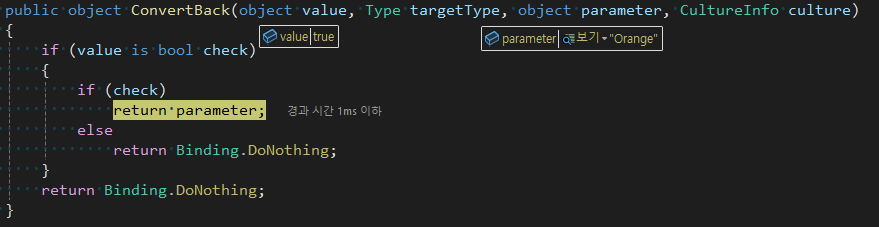
그리고 당연히 value는 bool 타입이고, ‘오렌지’ 라디오 버튼을 체크했으니 true여서 parameter를 반환합니다. 그 다음으로 MainViewModel의 SelectedFruit의 Set이 실행됩니다.
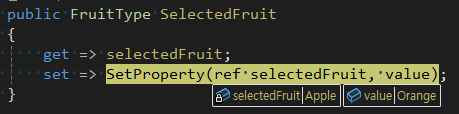
Apple에서 Orange로 바뀌게 됩니다. 그 다음 SelectedFruit 속성이 Orange로 바뀌었으니 PropertyChanged 이벤트가 발생되어 각각의 라디오 버튼들은 Convert 함수를 통해 체크인지 아닌지를 결정합니다.
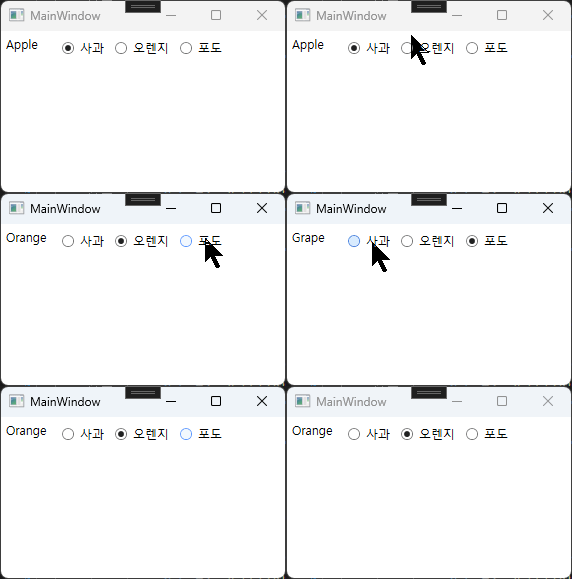
실제로 동작하는 것을 확인해봅니다.
이상으로 RadioButton에 대해 알아보았습니다.