![[WPF] DependencyProperty 만들기 – Behavior 사용해서 ProgressBar 색상 바꾸기](https://3001ssw.com/wp-content/uploads/2026/01/blog_main_banner4.png)
이번 글에서는 DependencyProperty를 사용하여 Behavior에 속성을 만들어 ProgressBar 색상 바꾸는 작업을 해보겠습니다.
DependencyProperty(의존성 속성)는 WPF 프레임워크가 값을 직접 관리해 주는 특별한 속성입니다. 일반적인 C# 속성은 클래스 내부 변수에 값을 저장하고 끝이지만, 의존성 속성은 프레임워크의 중앙 저장소에 등록되어 관리됩니다. 이름이 의존성인 이유는 해당 속성 값이 다른 여러 값이나 조건에 의존하여 결정되기 때문입니다.
DependencyProperty를 만드려면 아래 형식처럼 의존성 속성을 static으로 등록하고, Wrapper를 만들어줍니다. 또한 값이 변경될 때 실행되는 callback도 등록합니다.
public class MyControl : FrameworkElement
{
    // 1. 의존성 속성 등록 (static)
    public static readonly DependencyProperty MyValueProperty =
        DependencyProperty.Register(
            "MyValue",                  // 속성 이름
            typeof(int),                // 속성 타입
            typeof(MyControl),          // 소유자 타입
            new PropertyMetadata(0, OnValueChanged)); // 기본값과 콜백 설정

    // 2. 일반 속성처럼 보이기 위한 래퍼(Wrapper)
    public int MyValue
    {
        get => (int)GetValue(MyValueProperty);
        set => SetValue(MyValueProperty, value);
    }

    // 3. 값이 변경될 때 실행되는 콜백 (심화)
    private static void OnValueChanged(DependencyObject d, DependencyPropertyChangedEventArgs e)
    {
        // 값이 바뀔 때마다 실행할 로직 (예: UI 갱신)
    }
}
만들 프로그램 예시
이제 Behavior에 DependencyProperty를 등록하여 예시 코드를 만들어보겠습니다. ProgressBar에 대한 Behavior를 만들어 볼텐데, 일반적으로 ProgressBar는 진행률을 보여주기 위한 컨트롤로 보통 아래와 같이 한 가지 색으로 동작합니다.
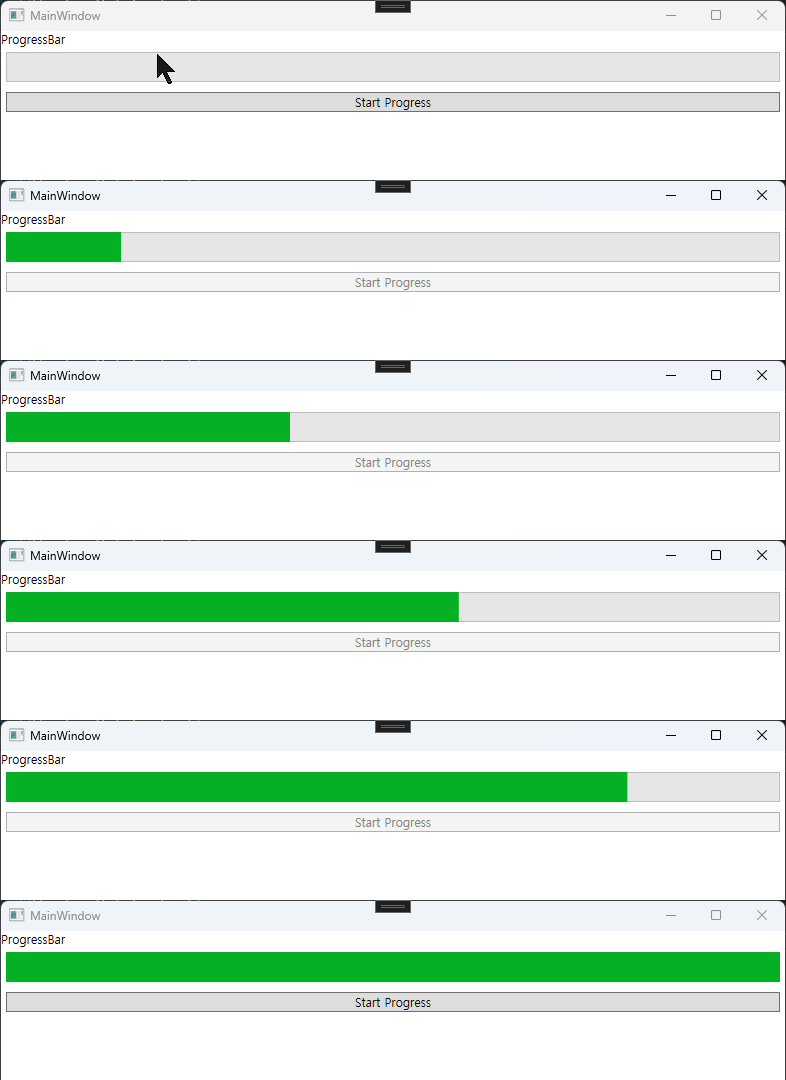
이렇게 동작하는게 아니라 일정 진행률 이상이 되면 색상도 바꿔주고, 깜빡이는 애니메이션도 표현하는 IsVisibleSmart 속성을 만들어 참일 경우 해당 값으로 표현해보겠습니다.
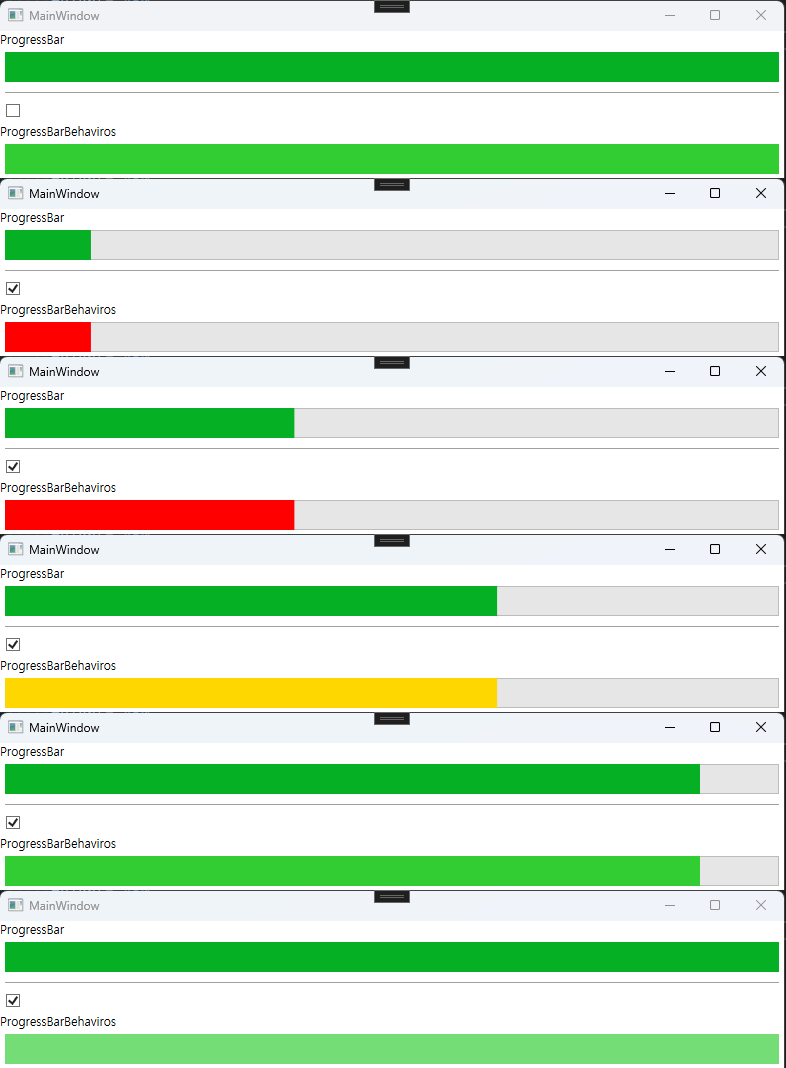
이런 컨트롤을 만들어볼 예정입니다.
Behavior에 DependencyProperty 사용하여 ProgressBarBehavior 만들기
우선 빠르게 View를 만들어 보겠습니다.
<Window x:Class="WpfDependencyProperty.MainWindow"
        xmlns="http://schemas.microsoft.com/winfx/2006/xaml/presentation"
        xmlns:x="http://schemas.microsoft.com/winfx/2006/xaml"
        xmlns:d="http://schemas.microsoft.com/expression/blend/2008"
        xmlns:mc="http://schemas.openxmlformats.org/markup-compatibility/2006"
        xmlns:local="clr-namespace:WpfDependencyProperty"
        xmlns:b="http://schemas.microsoft.com/xaml/behaviors"
        mc:Ignorable="d"
        Title="MainWindow"
        Height="450"
        Width="800">
    <Window.DataContext>
        <local:MainWindowViewModel/>
    </Window.DataContext>
    <StackPanel>
        <TextBlock Text="ProgressBar"/>
        <ProgressBar Height="30"
                     Margin="5"
                     Value="{Binding Percent}"/>
        <Separator Margin="5"/>
        <CheckBox IsChecked="{Binding IsChecked}"
                  Margin="5"/>
        <TextBlock Text="ProgressBarBehaviros"/>
        <ProgressBar Height="30"
                     Margin="5"
                     Value="{Binding Percent}">
            <b:Interaction.Behaviors>
                <local:ProgressBarBehavior IsVisibleSmart="{Binding IsChecked}"/>
            </b:Interaction.Behaviors>
        </ProgressBar>
        <Separator Margin="5"/>
        <Button Margin="5"
                Content="Start Progress"
                Command="{Binding StartProgressCommand}"/>
    </StackPanel>
</Window>
그리고 ViewModel도 만들어 봅니다.
public class MainWindowViewModel : BindableBase
{
    private double percent = 0.0;
    public double Percent { get => percent; set => SetProperty(ref percent, value); }

    private CancellationTokenSource cts = null;
    public DelegateCommand StartProgressCommand { get; }

    public MainWindowViewModel()
    {
        StartProgressCommand = new DelegateCommand(OnStartProgress, CanStartProgress);
    }

    private async void OnStartProgress()
    {
        cts = new CancellationTokenSource();
        CancellationToken token = cts.Token;
        StartProgressCommand.RaiseCanExecuteChanged();

        await Task.Run(async () =>
        {
            for (double p = 0; p <= 100; p+=0.1)
            {
                Percent = p;
                await Task.Delay(10);
            }
        }, token);

        cts?.Dispose();
        cts = null;
        StartProgressCommand.RaiseCanExecuteChanged();
    }

    private bool CanStartProgress()
    {
        if (cts == null)
            return true;
        else
            return false;
    }
여기까지 코드는 크게 어려운 것이 없습니다. 아래와 같이 ProgressBarBehavior 클래스도 만들어줍니다.
public class ProgressBarBehavior : Behavior<ProgressBar>
{
    public static readonly DependencyProperty IsVisibleSmartPropety =
        DependencyProperty.Register(
            "IsVisibleSmart", // 속성 이름
            typeof(bool), // 속성 데이터 타입
            typeof(ProgressBarBehavior), // 이 속성을 소유한 클래스
            new PropertyMetadata(false, IsVisibleSmartChanged)); // 기본값 (false으로 설정)

    public bool IsVisibleSmart
    {
        get => (bool)GetValue(IsVisibleSmartPropety);
        set => SetValue(IsVisibleSmartPropety, value);
    }

    private static void IsVisibleSmartChanged(DependencyObject d, DependencyPropertyChangedEventArgs e)
    {
        if (d is ProgressBarBehavior progressBarBehavior)
        {
            progressBarBehavior.UpdateVisual();
        }
    }

    protected override void OnAttached()
    {
        base.OnAttached();

        if (AssociatedObject != null)
        {
            AssociatedObject.ValueChanged += OnValueChanged;
            UpdateVisual();
        }
    }

    protected override void OnDetaching()
    {
        if (AssociatedObject != null)
            AssociatedObject.ValueChanged -= OnValueChanged;

        base.OnDetaching();
    }

    private void OnValueChanged(object sender, RoutedPropertyChangedEventArgs<double> e)
    {
        if (sender is ProgressBar progressBar)
            UpdateVisual();
    }

    private bool _isBlinking = false;
    private void UpdateVisual()
    {
        if (AssociatedObject is ProgressBar progressBar)
        {
            if (!IsVisibleSmart)
            {
                // 원상 복귀
                AssociatedObject.BeginAnimation(UIElement.OpacityProperty, null);
                AssociatedObject.Opacity = 1.0;
                AssociatedObject.Foreground = Brushes.LimeGreen;
                _isBlinking = false;
            }
            else
            {
                double pct = AssociatedObject.Maximum == 0 ? 0 : (AssociatedObject.Value / AssociatedObject.Maximum) * 100.0;

                // 색상 변경
                if (pct < 50)
                    AssociatedObject.Foreground = Brushes.Red; // 50 이하 빨간색
                else if (pct < 80)
                    AssociatedObject.Foreground = Brushes.Gold; // 80 이하 황금색
                else
                    AssociatedObject.Foreground = Brushes.LimeGreen; // 그 외 초록색

                // 90 이상이면 깜빡이는 애니메이션
                if (90 <= pct)
                {
                    if (_isBlinking == false)
                    {
                        var anim = new DoubleAnimation
                        {
                            From = 1.0,
                            To = 0.3,
                            Duration = TimeSpan.FromSeconds(0.5),
                            AutoReverse = true,
                            RepeatBehavior = RepeatBehavior.Forever
                        };
                        AssociatedObject.BeginAnimation(UIElement.OpacityProperty, anim);
                        _isBlinking = true;
                    }
                }
                else
                {
                    _isBlinking = false;
                    AssociatedObject.BeginAnimation(UIElement.OpacityProperty, null);
                    AssociatedObject.Opacity = 1.0;
                }
            }
        }
    }
}
실행 하면 아래와 같이 동작합니다.
ProgressBar를 상속받아 DependencyProperty 등록하기 (Behavior 사용 X)
Behavior에 엮어보려고 위와 같이 만들었지만 아예 ProgressBar를 상속 받아 SmartProgressBar를 만들어서 사용할 수도 있습니다.
<Window x:Class="WpfDependencyProperty.MainWindow"
        xmlns="http://schemas.microsoft.com/winfx/2006/xaml/presentation"
        xmlns:x="http://schemas.microsoft.com/winfx/2006/xaml"
        xmlns:d="http://schemas.microsoft.com/expression/blend/2008"
        xmlns:mc="http://schemas.openxmlformats.org/markup-compatibility/2006"
        xmlns:local="clr-namespace:WpfDependencyProperty"
        xmlns:b="http://schemas.microsoft.com/xaml/behaviors"
        mc:Ignorable="d"
        Title="MainWindow"
        Height="450"
        Width="800">
    <Window.DataContext>
        <local:MainWindowViewModel/>
    </Window.DataContext>
    <StackPanel>
        <TextBlock Text="ProgressBar"/>
        <ProgressBar Height="30"
                     Margin="5"
                     Value="{Binding Percent}"/>
        <Separator Margin="5"/>
        <CheckBox IsChecked="{Binding IsChecked}"
                  Margin="5"/>
        <TextBlock Text="ProgressBarBehaviros"/>
        <ProgressBar Height="30"
                     Margin="5"
                     Value="{Binding Percent}">
            <b:Interaction.Behaviors>
                <local:ProgressBarBehavior IsVisibleSmart="{Binding IsChecked}"/>
            </b:Interaction.Behaviors>
        </ProgressBar>
        <Separator Margin="5"/>
        <TextBlock Text="SmartProgressBar"/>
        <local:SmartProgressBar Height="30"
                                Margin="5"
                                Value="{Binding Percent}"
                                IsVisibleSmart="{Binding IsChecked}"/>
        <Separator Margin="5"/>
        <Button Margin="5"
                Content="Start Progress"
                Command="{Binding StartProgressCommand}"/>
    </StackPanel>
</Window>
public class SmartProgressBar : ProgressBar
{
    public static readonly DependencyProperty IsVisibleSmartPropety =
        DependencyProperty.Register(
            "IsVisibleSmart", // 속성 이름
            typeof(bool), // 속성 데이터 타입
            typeof(SmartProgressBar), // 이 속성을 소유한 클래스
            new PropertyMetadata(false, IsVisibleSmartChanged)); // 기본값 (false으로 설정)

    public bool IsVisibleSmart
    {
        get => (bool)GetValue(IsVisibleSmartPropety);
        set => SetValue(IsVisibleSmartPropety, value);
    }

    private static void IsVisibleSmartChanged(DependencyObject d, DependencyPropertyChangedEventArgs e)
    {
        if (d is SmartProgressBar smartProgressBar)
        {
            smartProgressBar.UpdateVisual();
        }
    }

    public SmartProgressBar()
    {
        this.ValueChanged += OnValueChanged;
    }

    private void OnValueChanged(object sender, RoutedPropertyChangedEventArgs<double> e)
    {
        if (sender is SmartProgressBar progressBar)
            UpdateVisual();
    }

    private bool _isBlinking = false;
    private void UpdateVisual()
    {
        if (!IsVisibleSmart)
        {
            // 원상 복귀
            BeginAnimation(UIElement.OpacityProperty, null);
            Opacity = 1.0;
            Foreground = Brushes.LimeGreen;
            _isBlinking = false;
        }
        else
        {
            double pct = Maximum == 0 ? 0 : (Value / Maximum) * 100.0;

            // 색상 변경
            if (pct < 50)
                Foreground = Brushes.Red; // 50 이하 빨간색
            else if (pct < 80)
                Foreground = Brushes.Gold; // 80 이하 황금색
            else
                Foreground = Brushes.LimeGreen; // 그 외 초록색

            // 90 이상이면 깜빡이는 애니메이션
            if (90 <= pct)
            {
                if (_isBlinking == false)
                {
                    var anim = new DoubleAnimation
                    {
                        From = 1.0,
                        To = 0.3,
                        Duration = TimeSpan.FromSeconds(0.5),
                        AutoReverse = true,
                        RepeatBehavior = RepeatBehavior.Forever
                    };
                    BeginAnimation(UIElement.OpacityProperty, anim);
                    _isBlinking = true;
                }
            }
            else
            {
                _isBlinking = false;
                BeginAnimation(UIElement.OpacityProperty, null);
                Opacity = 1.0;
            }
        }
    }
}
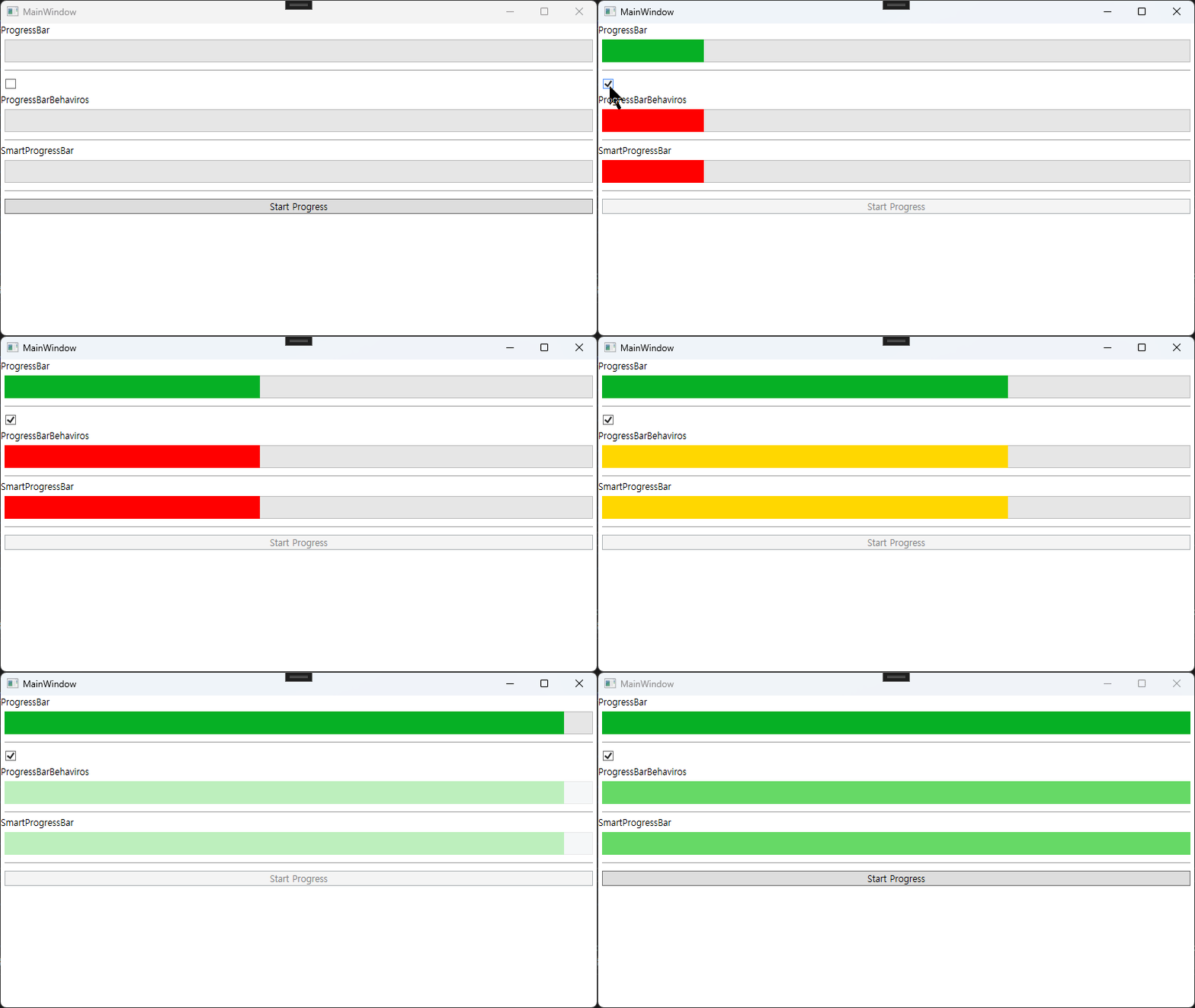
DependencyProperty에 대해 알아보았습니다.
github : https://github.com/3001ssw/c_sharp/tree/main/WPF/WPF_Basic/WpfDependencyProperty