![[WPF] DependencyProperty 사용하여 Command 만들기](https://3001ssw.com/wp-content/uploads/2026/01/blog_main_banner4.png)
이전 글 DependencyProperty를 사용해서 Behavior에 속성을 만들어 보았습니다. 속성을 만든 것처럼 Command도 만들어 Binding 할 수 있습니다. 이번 글에서는 DependencyProperty 사용해서 탐색기에서 파일을 Drag 해서 Drop을 받는 Command를 만들어 보겠습니다.
Command로 만든 다고 하여 크게 다르지 않습니다. 속성에서 만든 것처럼 만드는데 타입은 ICommand 타입으로 만들면 됩니다.
public static readonly DependencyProperty FilesDropCommandProperty =
        DependencyProperty.Register("FilesDropCommand",
            typeof(ICommand), // ICommand
            typeof(DragDropBehavior),
            new PropertyMetadata(null)); // 기본 값 null
우선 MainWindow.xaml에 아래와 같이 파일 Drop을 받을 DataGrid를 하나 만들어 줍니다.
<Window x:Class="WpfDependencyProperty2.MainWindow"
        xmlns="http://schemas.microsoft.com/winfx/2006/xaml/presentation"
        xmlns:x="http://schemas.microsoft.com/winfx/2006/xaml"
        xmlns:d="http://schemas.microsoft.com/expression/blend/2008"
        xmlns:mc="http://schemas.openxmlformats.org/markup-compatibility/2006"
        xmlns:local="clr-namespace:WpfDependencyProperty2"
        xmlns:b="clr-namespace:WpfDependencyProperty2.Behavior"
        xmlns:i="http://schemas.microsoft.com/xaml/behaviors"
        mc:Ignorable="d"
        Title="MainWindow"
        Height="450"
        Width="800">
    <Window.DataContext>
        <local:MainViewModel/>
    </Window.DataContext>
    <Grid>
        <DataGrid ItemsSource="{Binding Files}"
                  AutoGenerateColumns="False"
                  HeadersVisibility="Column"
                  CanUserAddRows="False"
                  IsReadOnly="True"
                  VirtualizingStackPanel.ScrollUnit="Pixel"
                  VirtualizingStackPanel.VirtualizationMode="Recycling"
                  ScrollViewer.CanContentScroll="True"
                  SelectionUnit="FullRow">
            <i:Interaction.Behaviors>
                <b:DragDropBehavior FilesDropCommand="{Binding FilesDropCommand}"/>
            </i:Interaction.Behaviors>
            <DataGrid.Columns>
                <DataGridTextColumn Header="Name"
                                    Binding="{Binding FileName, Mode=TwoWay, UpdateSourceTrigger=PropertyChanged}"
                                    Width="100"/>
                <DataGridTextColumn Header="Path"
                                    Binding="{Binding FilePath, Mode=TwoWay, UpdateSourceTrigger=PropertyChanged}"
                                    Width="*"/>
            </DataGrid.Columns>
        </DataGrid>
    </Grid>
</Window>
그 다음 MainViewModel.cs를 만들어줍니다.
public class MainViewModel : BindableBase
{
    #region fields, properties
    private ObservableCollection<FileInfo> files = new ObservableCollection<FileInfo>();
    public ObservableCollection<FileInfo> Files { get => files; set => SetProperty(ref files, value); }

    public DelegateCommand<string[]> FilesDropCommand { get; private set; }
    #endregion

    public MainViewModel()
    {
        FilesDropCommand = new DelegateCommand<string[]>(OnFilesDropCommand, CanFilesDropCommand);
    }

    private void OnFilesDropCommand(string[] files)
        {
            if (files.Count() <= 0)
                return;

            foreach (string file in files)
            {
                if (File.Exists(file) == false)
                    continue;

                FileInfo fi = new FileInfo();
                fi.FileName = Path.GetFileName(file);
                fi.FilePath = file;

                Files.Add(fi);
            }
        }

    private bool CanFilesDropCommand(string[] files)
        {
            return true;
        }
}
Files는 드랍 파일 목록을 표시하기 위한 컬렉션이고, FilesDropCommand는 파일이 드랍 되었을 때 파일 목록을 받을 ICommand 변수 입니다.
Files 컬렉션의 요소로 정의되어 있는 FileInfo를 만들어줘야합니다. 아래와 같이 FileInfo를 정의합니다.
public class FileInfo : BindableBase
{
    #region fields, properties
    private string fileName = "";
    public string FileName { get => fileName; set => SetProperty(ref fileName, value); }

    private string filePath = "";
    public string FilePath { get => filePath; set => SetProperty(ref filePath, value); }
    #endregion
}
이제 Behavior를 만들어 보겠습니다. DragDropBehavior.cs를 하나 만들고 아래와 같이 코드를 만들어줍니다.
public class DragDropBehavior : Behavior<FrameworkElement>
{
    #region files drop
    public static readonly DependencyProperty FilesDropCommandProperty =
            DependencyProperty.Register("FilesDropCommand",
                typeof(ICommand),
                typeof(DragDropBehavior),
                new PropertyMetadata(null));

    public ICommand FilesDropCommand
    {
        get => (ICommand)GetValue(FilesDropCommandProperty);
        set => SetValue(FilesDropCommandProperty, value);
    }

    #region override
        protected override void OnAttached()
        {
            base.OnAttached();

            AssociatedObject.AllowDrop = true;

            AssociatedObject.PreviewDragOver += OnPreviewDragOver;
            AssociatedObject.PreviewDrop += OnPreviewDrop;
        }

        protected override void OnDetaching()
        {
            base.OnDetaching();

            AssociatedObject.PreviewDragOver -= OnPreviewDragOver;
            AssociatedObject.PreviewDrop -= OnPreviewDrop;
        }
        #endregion

    private void OnPreviewDragOver(object sender, DragEventArgs e)
    {
        string[] formats = e.Data.GetFormats();
        foreach (string format in formats)
        {
            ICommand? command = null;
            if (format == DataFormats.FileDrop)
                command = FilesDropCommand;
            else
                command = null;

            if (command != null)
            {
                object data = e.Data.GetData(format);
                bool bCan = command.CanExecute(data);
                if (bCan)
                    e.Effects = DragDropEffects.Copy | DragDropEffects.Move;
                else
                    e.Effects = DragDropEffects.None;
                e.Handled = true;
            }
        }
    }

    private void OnPreviewDrop(object s, DragEventArgs e)
    {

        string[] formats = e.Data.GetFormats();
        foreach (string format in formats)
        {
            if (e.Data.GetDataPresent(format))
            {
                ICommand? command = null;
                if (format == DataFormats.FileDrop)
                    command = FilesDropCommand;
                else
                    command = null;

                if (command != null)
                {
                    object data = e.Data.GetData(format);
                    bool bCan = command.CanExecute(data);
                    if (bCan)
                        command.Execute(data);
                }
            }
        }
    }
    #endregion
만약 CanFilesDropCommand이 return true가 아니라 일정 조건에 따라 false를 반환하면 드래그 오버 상태에서 드래그 & 드랍 이펙트가 아무것도 표현되지 않을 것입니다. 위 코드를 실행하여 확인해 봅니다.
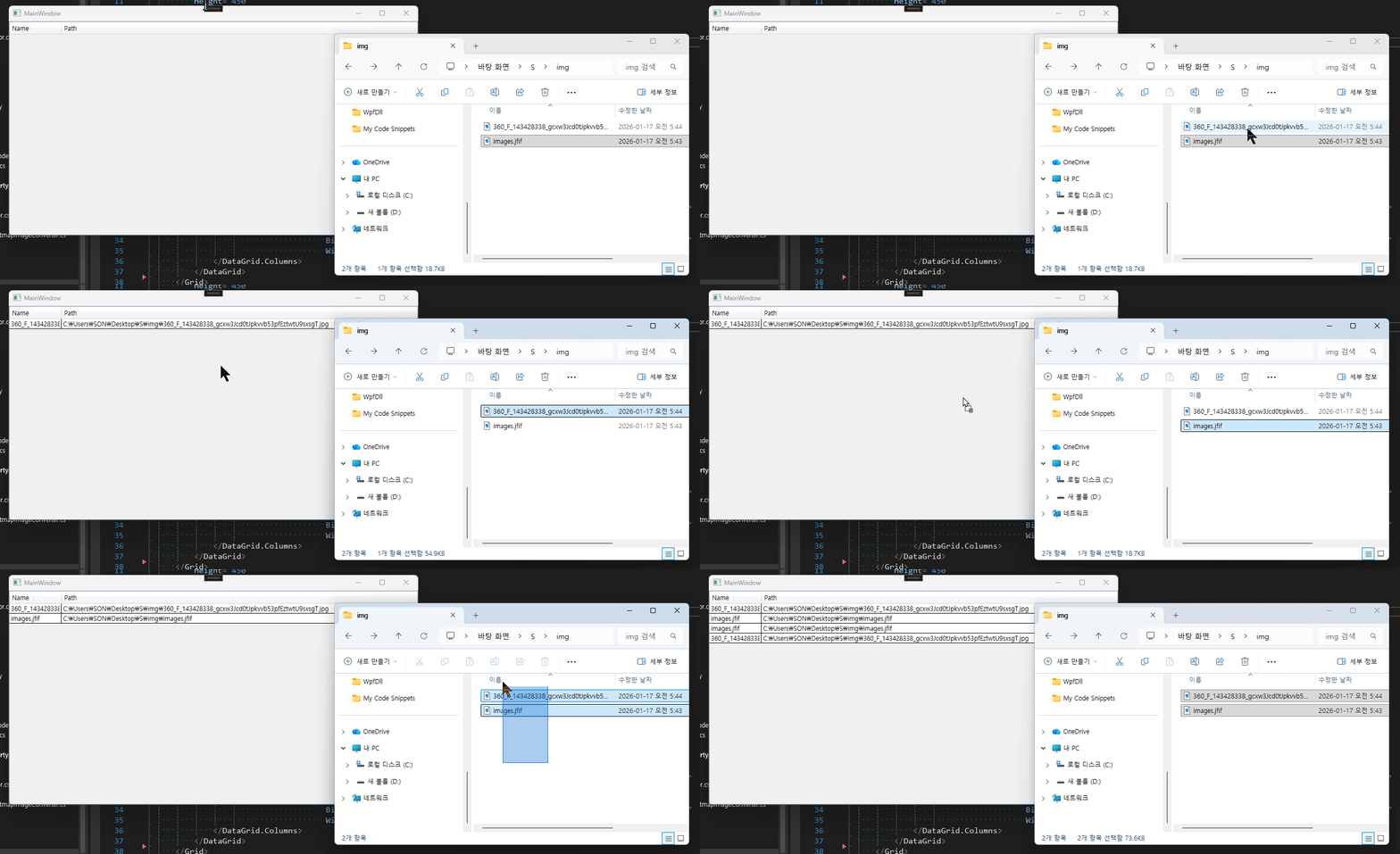
이상으로 DependencyProperty를 사용하여 Behavior에 Command를 정의해서 File Drop을 구현해보았습니다.
추가적으로 위 내용이 포함된 github 링크에 DataGrid 컨트롤의 Drag 기능과, Image 컨트롤에 Drop하는 기능을 구현해 두었습니다. DependencyProperty를 사용하여 어떻게 Drag 기능이 어떻게 구현되었는지 보시면 좋을 것 같습니다.