![[WPF] UDP 통신](https://3001ssw.com/wp-content/uploads/2026/01/blog_main_banner4.png)
이번 글에서는 UDP 통신에 대해 알아보겠습니다.
UDP에 대한 설명은 기존 글에도 많으니 설명보단, 만드는법 위주로 알아보겠습니다. C#으로 UDP 통신 하는 방법은 굉장히 간단합니다. UdpClient 클래스를 사용하면 됩니다.
UdpClient
UdpClient는 C#에서 UDP 통신을 할 때 가장 기본적이고 널리 쓰이는 클래스입니다. 아래는 UdpClient의 핵심 메서드와 속성입니다.
- Send(byte[] 데이터, int 길이, string? 아이피, int 포트) : 데이터를 송신하는 메시지 입니다.
- Receive([NotNull] ref IPEndPoint? 발신자 아이피, 포트 정보) : 데이터를 수신하는 메서드 입니다. 데이터가 수신 될 때 까지 대기(Blocking)합니다. 인자로 들어가는 IPEndPoint 클래스는 IP와 Port를 하나의 세트로 묶어주는 클래스인데 Receive에서는 데이터의 발신자를 알 수 있습니다.
- Available : 네트워크에서 받은 데이터의 바이트 수 입니다. 5번 수신하면 5 값을 가집니다.
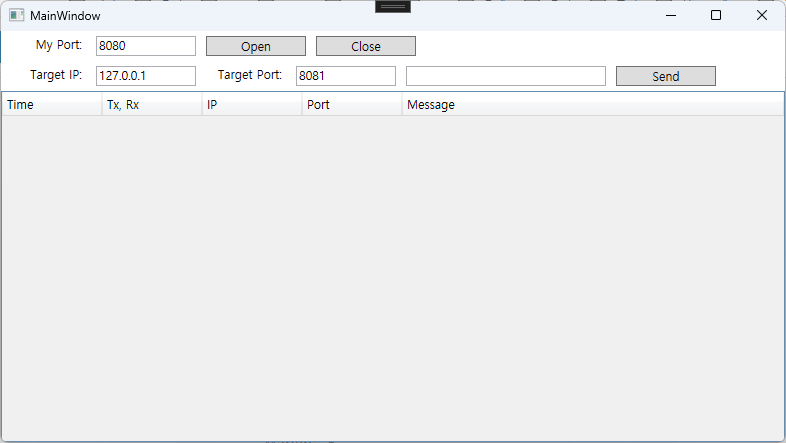
이제 화면을 만들어 보겠습니다. 아래와 같이 화면을 만들기 위해 xaml을 코딩해줍니다.
<Window x:Class="WpfUdp.MainWindow"
        xmlns="http://schemas.microsoft.com/winfx/2006/xaml/presentation"
        xmlns:x="http://schemas.microsoft.com/winfx/2006/xaml"
        xmlns:d="http://schemas.microsoft.com/expression/blend/2008"
        xmlns:mc="http://schemas.openxmlformats.org/markup-compatibility/2006"
        xmlns:local="clr-namespace:WpfUdp"
        mc:Ignorable="d"
        Title="MainWindow"
        Height="450"
        Width="800">
    <Window.DataContext>
        <local:MainViewModel/>
    </Window.DataContext>
    <Grid>
        <Grid.RowDefinitions>
            <RowDefinition Height="Auto"/>
            <RowDefinition Height="Auto"/>
            <RowDefinition Height="1*"/>
        </Grid.RowDefinitions>
        <StackPanel Grid.Row="0"
                    Orientation="Horizontal">
            <TextBlock Width="80"
                       Margin="5"
                       TextAlignment="Right"
                       Text="My Port: "/>
            <TextBox Width="100"
                     Margin="5"
                     Text="{Binding MyPort}"/>
            <Button Width="100"
                    Margin="5"
                    Content="Open"
                    Command="{Binding UdpOpenCommand}"/>
            <Button Width="100"
                    Margin="5"
                    Content="Close"
                    Command="{Binding UdpCloseCommand}"/>
        </StackPanel>

        <StackPanel Grid.Row="1"
                    Orientation="Horizontal">
            <TextBlock Width="80"
                       Margin="5"
                       TextAlignment="Right"
                       Text="Target IP: "/>
            <TextBox Width="100"
                     Margin="5"
                     Text="{Binding TargetIp}"/>
            <TextBlock Width="80"
                       Margin="5"
                       TextAlignment="Right"
                       Text="Target Port: "/>
            <TextBox Width="100"
                     Margin="5"
                     Text="{Binding TargetPort}"/>
            <TextBox Width="200"
                     Margin="5"
                     Text="{Binding SendData}"/>
            <Button Width=" 100"
                    Margin="5"
                    Content="Send"
                    Command="{Binding UdpSendCommand}"/>
        </StackPanel>

        <DataGrid Grid.Row="2"
                  ItemsSource="{Binding UdpRecvMessages}"
                  IsReadOnly="True"
                  AutoGenerateColumns="False"
                  HeadersVisibility="Column"
                  CanUserDeleteRows="False"
                  CanUserAddRows="False"
                  SelectionUnit="FullRow"
                  VirtualizingStackPanel.ScrollUnit="Pixel"
                  VirtualizingStackPanel.VirtualizationMode="Recycling"
                  ScrollViewer.CanContentScroll="True">

            <DataGrid.Columns>
                <DataGridTextColumn Header="Time"
                                    Width="100"
                                    IsReadOnly="True"
                                    Binding="{Binding Time}"/>
                <DataGridTextColumn Header="Tx, Rx"
                                    Width="100"
                                    IsReadOnly="True"
                                    Binding="{Binding TxRx}"/>
                <DataGridTextColumn Header="IP"
                                    Width="100"
                                    IsReadOnly="True"
                                    Binding="{Binding Ip}"/>
                <DataGridTextColumn Header="Port"
                                    Width="100"
                                    IsReadOnly="True"
                                    Binding="{Binding Port}"/>
                <DataGridTextColumn Header="Message"
                                    Width="1*"
                                    Binding="{Binding Message}"/>
            </DataGrid.Columns>
        </DataGrid>
    </Grid>
</Window>
DataGrid에 표시되는 아이템에 대한 클래스를 먼저 만들어 보겠습니다. UdpMessage.cs를 만들어 아래와 같이 코딩해줍니다.
public class UdpMessage
{
    public string Time { get; set; } = "";
    public string TxRx { get; set; } = "";
    public string Ip { get; set; } = "";
    public string Port { get; set; } = "";
    public string Message { get; set; } = "";

    public UdpMessage()
    {
        Time = DateTime.Now.ToString("HH:mm:ss.fff");
    }
}
그리고 MainViewModel.cs를 아래와 같이 만들어 줍니다.
public class MainViewModel : BindableBase
{
    #region Fields & Properties

    private UdpManager _udpManager = new UdpManager();

    private string myPort = "8080";
    public string MyPort { get => myPort; set => SetProperty(ref myPort, value); }

    private string targetIp = "127.0.0.1";
    public string TargetIp { get => targetIp; set => SetProperty(ref targetIp, value); }

    private string targetPort = "8081";
    public string TargetPort { get => targetPort; set => SetProperty(ref targetPort, value); }

    private string sendData = "";
    public string SendData { get => sendData; set => SetProperty(ref sendData, value); }

    private ObservableCollection<UdpMessage> udpRecvMessages = new ObservableCollection<UdpMessage>();
    public ObservableCollection<UdpMessage> UdpRecvMessages { get => udpRecvMessages; set => SetProperty(ref udpRecvMessages, value); }
    private object _lockUdpRecvMessages = new object(); // 동기화를 위한 자물쇠

    #endregion

    #region Commands

    public DelegateCommand UdpOpenCommand { get; private set; }
    public DelegateCommand UdpCloseCommand { get; private set; }
    public DelegateCommand UdpSendCommand { get; private set; }

    #endregion

    #region Constructor

    public MainViewModel()
    {
        BindingOperations.EnableCollectionSynchronization(UdpRecvMessages, _lockUdpRecvMessages);

        UdpOpenCommand = new DelegateCommand(OnUdpOpen);
        UdpCloseCommand = new DelegateCommand(OnUdpClose);
        UdpSendCommand = new DelegateCommand(OnUdpSend);
    }

    #endregion

    #region Methods

    private void OnUdpOpen()
    {
        if (!int.TryParse(MyPort, out int port))
        {
            MessageBox.Show("올바른 포트 번호를 입력하세요.");
            return;
        }

        if (_udpManager.IsOpen())
            return;

        _udpManager.MessageReceived += OnMessageReceived;
        _udpManager.StartListening(port);
    }

    private void OnUdpClose()
    {
        if (!_udpManager.IsOpen())
            return;

        _udpManager.StopListening();
        _udpManager.MessageReceived -= OnMessageReceived;
    }

    private void OnUdpSend()
    {
        _udpManager.Send(TargetIp, TargetPort, SendData);
    }

    private void OnMessageReceived(object? sender, UdpMessage message)
    {
        UdpRecvMessages.Add(message);
    }
    #endregion
}
그 다음 UdpManager.cs에 코드를 만들어 줍니다.
public class UdpManager
{
    private UdpClient? _listener;
    private Thread? _receiveThread;
    private bool _isRunning = false;

    public event EventHandler<UdpMessage>? MessageReceived;

    public void StartListening(int port)
        {
            if (_isRunning)
                return;

            try
            {
                _listener = new UdpClient(port);
                _isRunning = true;

                //수신 쓰레드 실행
                _receiveThread = new Thread(ThreadReceive)
                {
                    IsBackground = true
                };
                _receiveThread.Start();

                MessageReceived?.Invoke(this, new UdpMessage
                {
                    TxRx = "",
                    Message = "Start Listening"
                });
            }
            catch (Exception ex)
            {

                MessageReceived?.Invoke(this, new UdpMessage
                {
                    TxRx = "",
                    Message = $"Fail: {ex.Message}"
                });
            }
        }

    public void StopListening()
        {
            _isRunning = false;
            _receiveThread?.Join();

            _listener?.Close();
            _listener = null;

            MessageReceived?.Invoke(this, new UdpMessage
            {
                TxRx = "",
                Message = "Stop Listening"
            });
        }

    public int Send(string targetIp, string targetPort, string message)
        {
            int sendLen = 0;
            if (_isRunning == false || _listener == null)
                return sendLen;

            if (!int.TryParse(targetPort, out int port))
                return sendLen;

            byte[] data = Encoding.UTF8.GetBytes(message);

            MessageReceived?.Invoke(this, new UdpMessage
            {
                TxRx = "Tx",
                Ip = targetIp,
                Port = targetPort,
                Message = message
            });
            sendLen = _listener.Send(data, data.Length, targetIp, port);

            return sendLen;
        }

    public bool IsOpen()
        {
            return _isRunning;
        }

    private void ThreadReceive()
        {
            try
            {
                IPEndPoint remoteEndPoint = new IPEndPoint(IPAddress.Any, 0);

                while (_isRunning && _listener != null)
                {
                    if (0 < _listener.Available)
                    {
                        byte[] buffer = _listener.Receive(ref remoteEndPoint);

                        string message = Encoding.UTF8.GetString(buffer);
                        string senderIp = remoteEndPoint.Address.ToString();
                        string senderPort = remoteEndPoint.Port.ToString();

                        MessageReceived?.Invoke(this, new UdpMessage
                        {
                            TxRx = "Rx",
                            Ip = senderIp,
                            Port = senderPort,
                            Message = message
                        });

                        Thread.Sleep(10);
                    }
                    else
                        Thread.Sleep(100);
                }
            }
            catch (SocketException ex) when (ex.SocketErrorCode == SocketError.Interrupted || ex.SocketErrorCode == SocketError.OperationAborted)
            {
            }
            catch (ObjectDisposedException)
            {
            }
            catch (Exception ex)
            {
                System.Diagnostics.Debug.WriteLine($"ReceiveLoop Error: {ex.Message}");
            }
            finally
            {
                MessageReceived?.Invoke(this, new UdpMessage
                {
                    Message = "Stop Receive Thread",
                });
            }
        }
}
StartListening 함수를 호출 하면 UdpClient 객체가 생성되며 수신 쓰레드(ThreadReceive)를 실행하게 됩니다.
StopListening 함수를 호출하면 쓰레드가 종료되며 UdpClient 객체가 소멸됩니다.
Send 함수를 호출하면 타겟 IP, Port에 데이터를 전송합니다.
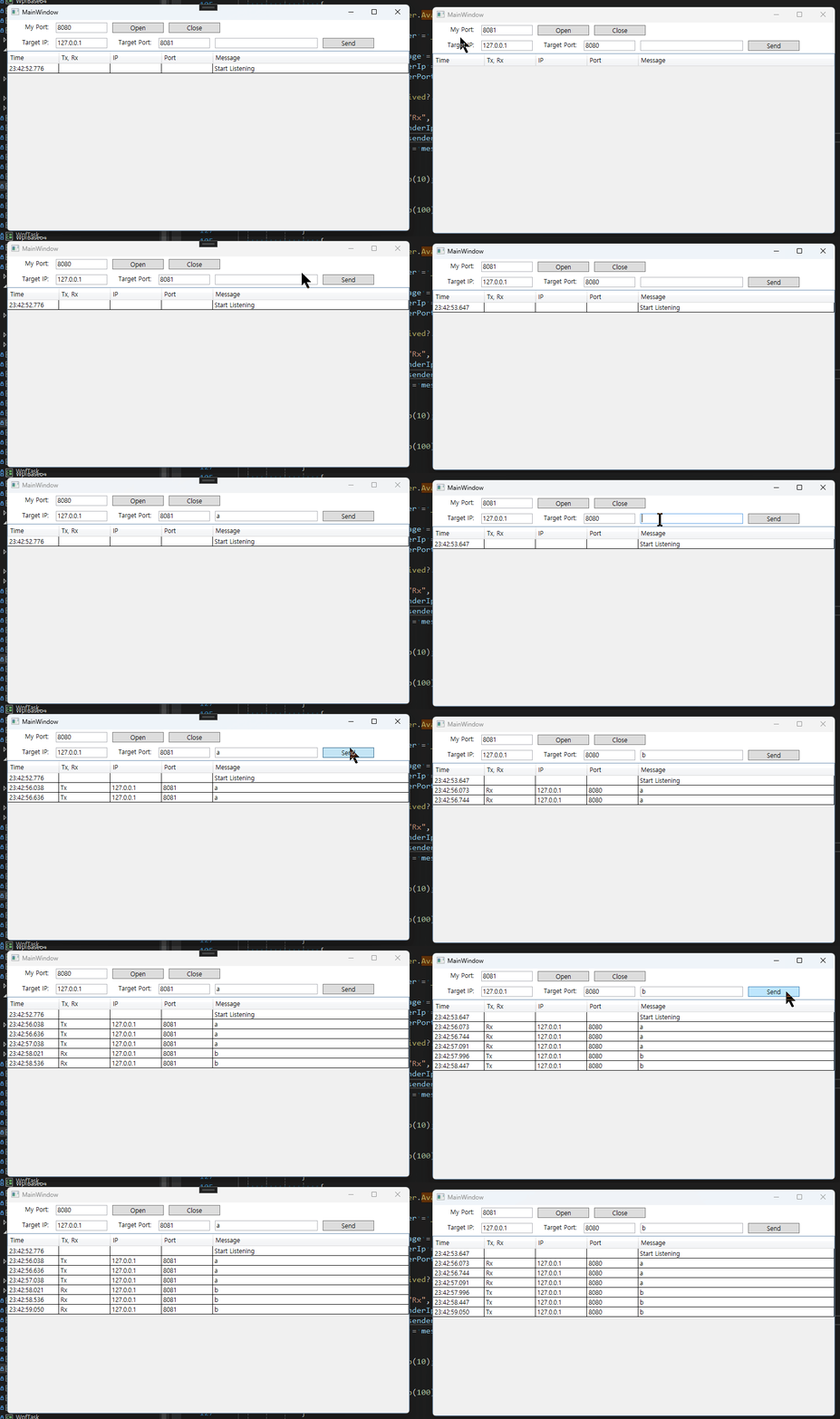
실행하면 아래와 같이 데이터를 주고 받습니다.