![[WPF] Named Pipe(NamedPipeServerStream, NamedPipeClientStream)](https://3001ssw.com/wp-content/uploads/2026/01/blog_main_banner4.png)
이번 글에서는 Named Pipe에 대해 알아보겠습니다.
Named Pipe는 로컬 PC에서 서로 다른 프로그램끼리 데이터를 주고받는 IPC(Inter-Process Communication) 기술 중 하나 입니다. 프로그램 끼리 파이프에 이름을 붙여 통신을 한다고 보시면 됩니다. TCP/IP 통신과 같이 서버와 클라이언트가 있으며 TCP/IP와 다르게 속도와 보안성, 그리고 이름만 알면 되는 간편함이 있습니다.
Named Pipe를 만드는 서버 쪽에서는 아래 항목을 기억하시면 됩니다.
- NamedPipeServerStream를 생성 한 뒤 WaitForConnection함수를 사용하여 접속하는 Client를 대기합니다.
Client가 접속 할 때까지 대기하며 접속 시 다음 코드로 진행됩니다. - StreamReader를 생성 한 뒤 ReadLine으로 데이터를 수신합니다.
- StreamWriter를 생성 한 뒤 WriteLine으로 데이터를 송신합니다.
- 종료 시 NamedPipeServerStream의 Close 함수를 호출합니다.
클라이언트 쪽도 서버와 비슷하게 아래 항목을 기억하시면 됩니다.
- NamedPipeClientStream를 생성한 뒤 ConnectAsync 함수로 서버에 접속합니다.
- StreamReader를 생성 한 뒤 ReadLine으로 데이터를 수신합니다.
- StreamWriter를 생성 한 뒤 WriteLine으로 데이터를 송신합니다.
- 종료 시 NamedPipeClientStream의 Close 함수를 호출합니다.
아래는 실제 코드 입니다. 먼저 Server쪽 코드입니다.
using Prism.Mvvm;
using System;
using System.Collections.Generic;
using System.Collections.ObjectModel;
using System.IO;
using System.IO.Pipes;
using System.Linq;
using System.Text;
using System.Threading.Tasks;
using System.Windows;
using System.Windows.Data;
using WpfPipeClient;

namespace WpfPipeServer
{
    public class MainViewModel : BindableBase
    {
        #region fields, properties
        private CancellationTokenSource? cs = null;
        public CancellationTokenSource? Cs { get => cs; set => SetProperty(ref cs, value); }

        private string pipeName = "testpipe";
        public string PipeName { get => pipeName; set => SetProperty(ref pipeName, value); }

        private ObservableCollection<PipeMessage> messages = new ObservableCollection<PipeMessage>();
        public ObservableCollection<PipeMessage> Messages { get => messages; set => SetProperty(ref messages, value); }

        private object lockMessages = new object();

        #endregion

        #region command methods

        public DelegateCommand PipeServerStartCommand { get; private set; }
        public DelegateCommand PipeServerCloseCommand { get; private set; }


        public MainViewModel()
        {
            PipeServerStartCommand = new DelegateCommand(OnPipeServerStart, CanPipeServerStart).ObservesProperty(() => Cs);
            PipeServerCloseCommand = new DelegateCommand(OnPipeServerClose, CanPipeServerClose).ObservesProperty(() => Cs);

            BindingOperations.EnableCollectionSynchronization(Messages, lockMessages);
        }

        private void OnPipeServerStart()
        {
            Cs = new CancellationTokenSource();
            Task.Run(() => PipeServerStartTask(Cs.Token));
        }

        private bool CanPipeServerStart()
        {
            if (Cs != null)
                return false;

            return true;
        }

        private void OnPipeServerClose()
        {
            Cs?.Cancel();
            Cs = null;
        }

        private bool CanPipeServerClose()
        {
            if (Cs == null)
                return false;

            return true;
        }

        #endregion


        private void AddMessage(string message)
        {
            Messages.Add(new PipeMessage()
            {
                Message = message,
            });
        }


        #region Task

        private void PipeServerStartTask(CancellationToken token)
        {
            AddMessage("Start Task");

            while (!token.IsCancellationRequested)
            {
                NamedPipeServerStream serverStream = new NamedPipeServerStream("testpipe",
                    PipeDirection.InOut,
                    NamedPipeServerStream.MaxAllowedServerInstances,
                    PipeTransmissionMode.Byte,
                    PipeOptions.Asynchronous);

                using (token.Register(() => serverStream?.Close()))
                {
                    try
                    {
                        serverStream.WaitForConnection();
                        //serverStream.WaitForConnectionAsync(token).Wait();
                        AddMessage("Client Connect");

                        Task.Run(() => PipeServerRecvTask(serverStream, token));

                        token.WaitHandle.WaitOne(100);
                    }
                    catch (Exception e)
                    {
                        AddMessage($"Exception: {e.Message}");
                    }
                    finally
                    {
                        if (token.IsCancellationRequested)
                            serverStream?.Close();
                    }
                }
            }

            AddMessage("End Task");
        }

        private void PipeServerRecvTask(NamedPipeServerStream serverStream, CancellationToken token)
        {
            StreamReader reader = new StreamReader(serverStream, Encoding.UTF8);
            using (token.Register(() => serverStream.Close()))
            {
                try
                {
                    while (!token.IsCancellationRequested)
                    {
                        string? msg = reader.ReadLine();
                        if (msg != null)
                        {
                            AddMessage($"read message: {msg}");
                            StreamWriter writer = new StreamWriter(serverStream, Encoding.UTF8) { AutoFlush = true };

                            AddMessage($"write message: {msg}");
                            writer.WriteLine(msg);
                            token.WaitHandle.WaitOne(100);
                        }
                        else
                        {
                            AddMessage("Client Close");
                            break;
                        }
                    }
                }
                catch (Exception ex)
                {
                    AddMessage($"Exception: {ex.Message}");
                }
                finally
                {
                    serverStream.Close();
                }
            }
        }

        #endregion
    }
}
파이프에 클라이언트가 여러 개 연결 할 수 있게 만든 코드라 조금 더 손을 봐야 하는데.. 이 정도면 예제로는 적당할 겁니다.
그 다음은 클라이언트 쪽 코드입니다.
using Prism.Mvvm;
using System;
using System.Collections.Generic;
using System.Collections.ObjectModel;
using System.IO;
using System.IO.Pipes;
using System.Linq;
using System.Text;
using System.Threading.Tasks;
using System.Windows.Data;

namespace WpfPipeClient
{
    public class MainViewModel : BindableBase
    {
        #region fields, properties
        private CancellationTokenSource? cs = null;
        //public CancellationTokenSource? cs { get => cs; set => SetProperty(ref cs, value); }

        private NamedPipeClientStream? clientStream = null;
        public NamedPipeClientStream? ClientStream { get => clientStream; set => SetProperty(ref clientStream, value); }


        private string pipeName = "testpipe";
        public string PipeName { get => pipeName; set => SetProperty(ref pipeName, value); }


        private string sendMessage = "";
        public string SendMessage { get => sendMessage; set => SetProperty(ref sendMessage, value); }


        private ObservableCollection<PipeMessage> messages = new ObservableCollection<PipeMessage>();
        public ObservableCollection<PipeMessage> Messages { get => messages; set => SetProperty(ref messages, value); }

        private object lockMessages = new object();

        #endregion

        #region command methods

        public DelegateCommand PipeClientConnectCommand { get; private set; }
        public DelegateCommand PipeClientCloseCommand { get; private set; }
        public DelegateCommand SendMessageCommand { get; private set; }

        public MainViewModel()
        {
            PipeClientConnectCommand = new DelegateCommand(OnPipeClientConnect, CanPipeClientConnect).ObservesProperty(() => ClientStream);
            PipeClientCloseCommand = new DelegateCommand(OnPipeClientClose, CanPipeClientClose).ObservesProperty(() => ClientStream);
            SendMessageCommand = new DelegateCommand(OnSendMessage, CanSendMessage).ObservesProperty(() => ClientStream).ObservesProperty(() => SendMessage);

            BindingOperations.EnableCollectionSynchronization(Messages, lockMessages);
        }

        private void OnPipeClientConnect()
        {
            cs = new CancellationTokenSource();
            Task.Run(() => PipeClientStartTask(cs.Token));
        }

        private bool CanPipeClientConnect()
        {
            if (ClientStream != null)
                return false;

            return true;
        }

        private void OnPipeClientClose()
        {
            cs?.Cancel();
            cs = null;
        }

        private bool CanPipeClientClose()
        {
            if (ClientStream == null)
                return false;

            return true;
        }

        private void OnSendMessage()
        {
            StreamWriter writer = new StreamWriter(ClientStream, Encoding.UTF8)
            {
                AutoFlush = true,
            };
            writer.WriteLine(SendMessage);
            AddMessage($"write message: {SendMessage}");
            SendMessage = "";
        }

        private bool CanSendMessage()
        {
            if (cs == null || string.IsNullOrEmpty(SendMessage))
                return false;

            return true;
        }

        #endregion

        private void PipeClientStartTask(CancellationToken token)
        {
            AddMessage("Task Start");

            try
            {
                ClientStream = new NamedPipeClientStream(".", PipeName, PipeDirection.InOut, PipeOptions.Asynchronous);

                ClientStream.ConnectAsync(token).Wait();

                AddMessage("Connect complete");

                StreamReader reader = new StreamReader(ClientStream, Encoding.UTF8);

                using (token.Register(() => ClientStream.Close()))
                {
                    while (!token.IsCancellationRequested)
                    {
                        string? msg = reader.ReadLine();
                        if (msg != null)
                        {
                            AddMessage($"read message: {msg}");

                            token.WaitHandle.WaitOne(100);
                        }
                        else
                        {
                            AddMessage("Server Close");
                            break;
                        }
                    }
                }
            }
            catch (Exception e)
            {
                AddMessage($"Exception: {e.Message}");
            }
            finally
            {
                ClientStream?.Close();
                ClientStream = null;
            }

            AddMessage("Task Close");
        }

        private void AddMessage(string message)
        {
            Messages.Add(new PipeMessage()
            {
                Message = message,
            });
        }

    }
}
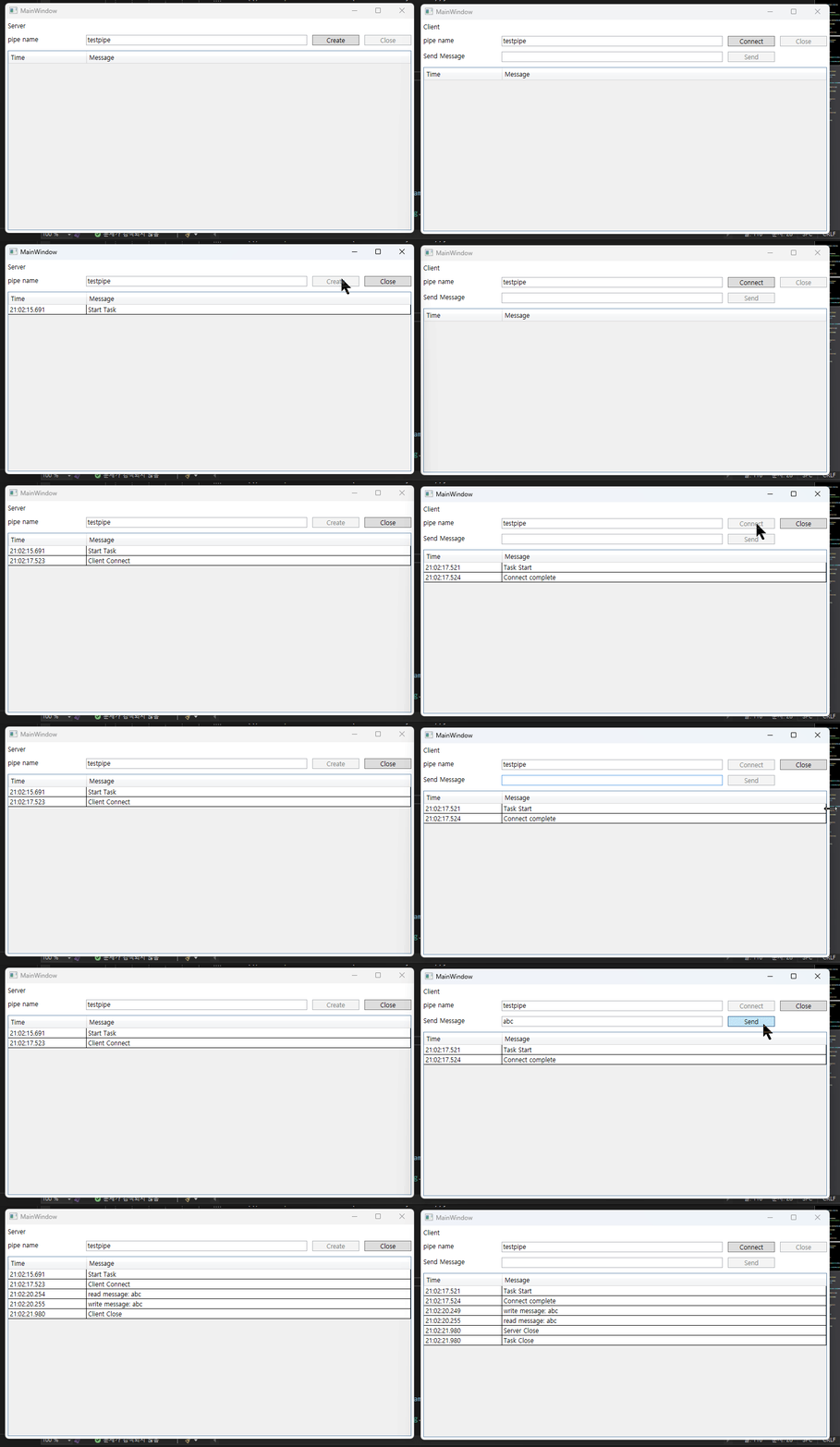
중간 중간 token.Register 코드는 동기 상태인 함수에 token이 Cancel할 때 함수를 등록하여 종료를 하기 위한 함수입니다. 위 코드를 실행하면 아래와 같이 동작하는 프로그램을 볼 수 있습니다.
전체 코드는 아래 깃헙 링크를 참고하시기 바랍니다.