![[WPF] INotifyDataErrorInfo – 사용자 입력 값 검증](https://3001ssw.com/wp-content/uploads/2026/01/blog_main_banner4.png)
이번 글에서는 INotifyDataErrorInfo에 대해 알아보겠습니다. INotifyDataErrorInfo는 사용자 입력 값을 검증하기 위한 인터페이스로 ViewModel에서 데이터 검증 오류를 UI에 알리는 방식을 제공하는 인터페이스입니다. 이 인터페이스를 사용하면 속성에 오류가 생겼을 때 UI에 알려주고 UI는 이를 표시할 수 있도록 합니다.
ViewModel에서 INotifyDataErrorInfo를 상속 받으면 아래의 3개의 인터페이스 멤버가 생성됩니다. 우리는 이 멤버를 구현해야 합니다.
// 현재 ViewModel에 하나라도 오류가 있는지 여부를 반환하는 bool 프로퍼티입니다.
public bool HasErrors => throw new NotImplementedException();
// 프로퍼티의 에러 상태가 바뀌었을 때 UI에게 알려주는 이벤트입니다.
public event EventHandler<DataErrorsChangedEventArgs>? ErrorsChanged;
// 해당 프로퍼티에 대한 에러(문자열 또는 객체)를 반환합니다.
public IEnumerable GetErrors(string? propertyName)
{
    throw new NotImplementedException();
}
속성 1개 입력 값 검증
우선 하나의 속성에 대한 입력 값을 검증하는 경우를 알아보겠습니다. 간단하게 TextBox를 하나 생성해서 숫자를 입력하면 빨간 테두리를 표시하는 코드를 구현 해보겠습니다. MainWindow.xaml에 아래와 같이 TextBox를 입력해줍니다.
<Window x:Class="WpfINotifyDataErrorInfo.MainWindow"
        xmlns="http://schemas.microsoft.com/winfx/2006/xaml/presentation"
        xmlns:x="http://schemas.microsoft.com/winfx/2006/xaml"
        xmlns:d="http://schemas.microsoft.com/expression/blend/2008"
        xmlns:mc="http://schemas.openxmlformats.org/markup-compatibility/2006"
        xmlns:local="clr-namespace:WpfINotifyDataErrorInfo"
        mc:Ignorable="d"
        Title="MainWindow"
        Height="450"
        Width="800">
    <Window.DataContext>
        <local:MainViewModel/>
    </Window.DataContext>
    <StackPanel>
        <TextBox Margin="5"
                 Text="{Binding InputText, UpdateSourceTrigger=PropertyChanged, ValidatesOnNotifyDataErrors=True}"/>
    </StackPanel>
</Window>
그 다음 MainViewModel.cs를 만들어 아래와 같이 만들어 줍니다.
namespace WpfINotifyDataErrorInfo
{
    public class MainViewModel : BindableBase, INotifyDataErrorInfo
    {
        private string inputText = "";
        public string InputText
        {
            get => inputText;
            set
            {
                SetProperty(ref inputText, value);
                ErrorsChanged?.Invoke(this, new DataErrorsChangedEventArgs(nameof(InputText)));
            }
        }

        public MainViewModel()
        {
        }

        // 현재 ViewModel에 하나라도 오류가 있는지 여부를 반환하는 bool 프로퍼티입니다.
        public bool HasErrors => InputText.Any(char.IsDigit);
        // 프로퍼티의 에러 상태가 바뀌었을 때 UI에게 알려주는 이벤트입니다.
        public event EventHandler<DataErrorsChangedEventArgs>? ErrorsChanged;
        // 해당 프로퍼티에 대한 에러(문자열 또는 객체)를 반환합니다.
        public IEnumerable GetErrors(string? propertyName)
        {
            if (propertyName == null || propertyName == nameof(InputText))
            {
                if (InputText.Any(char.IsDigit))
                    return new string[] { "숫자는 입력할 수 없습니다." };
            }

            return Enumerable.Empty<string>();
        }
    }
}
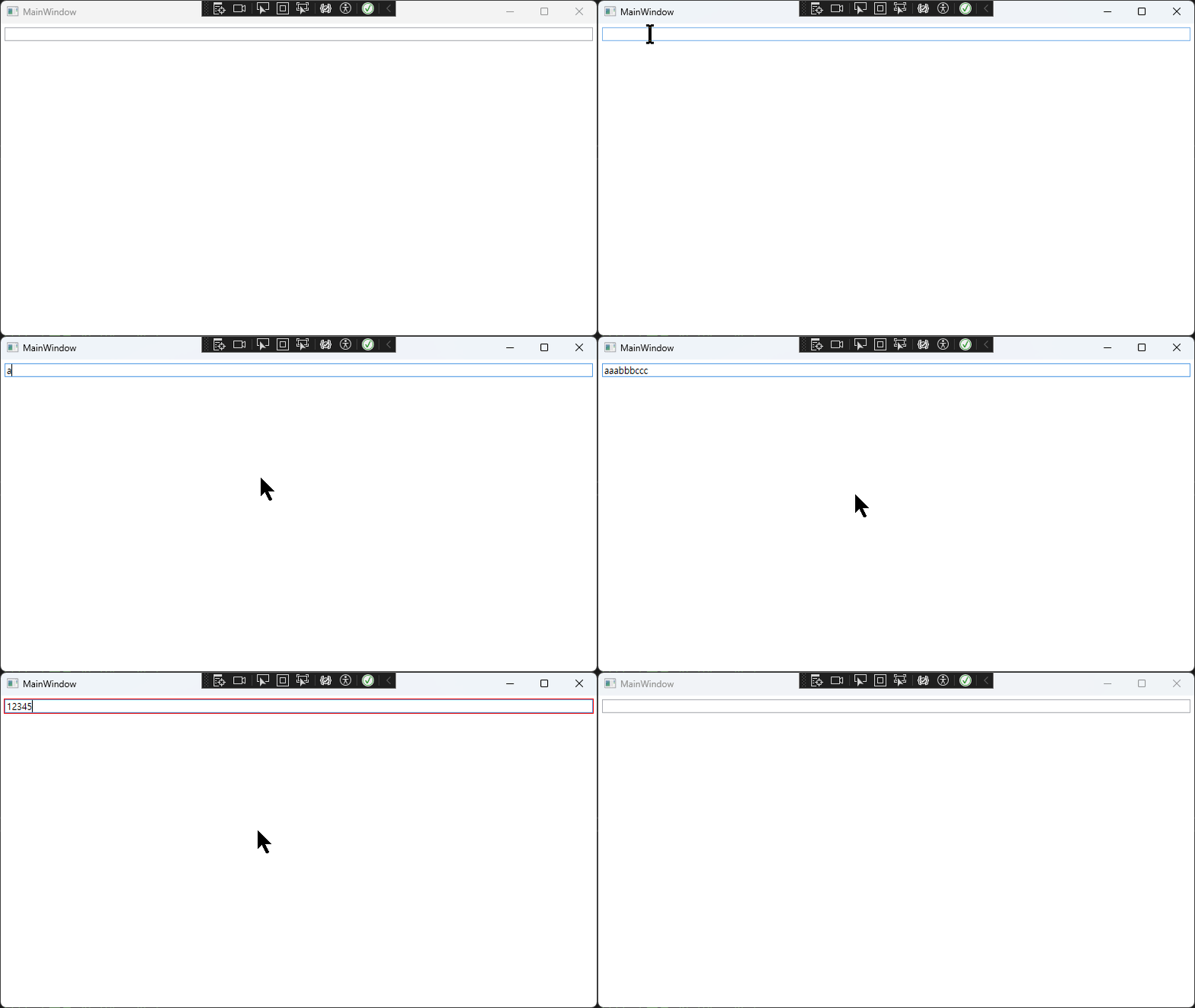
실행하면 아래와 같이 표시합니다.
속성 여러 개 입력 값 검증
속성이 여러 개 일 경우에는 조금 작업을 더 해줘야 합니다. 먼저 MainWindow.xaml에 TextBox를 여러개 만들어 줍니다.
<Window x:Class="WpfINotifyDataErrorInfo.MainWindow"
        xmlns="http://schemas.microsoft.com/winfx/2006/xaml/presentation"
        xmlns:x="http://schemas.microsoft.com/winfx/2006/xaml"
        xmlns:d="http://schemas.microsoft.com/expression/blend/2008"
        xmlns:mc="http://schemas.openxmlformats.org/markup-compatibility/2006"
        xmlns:local="clr-namespace:WpfINotifyDataErrorInfo"
        mc:Ignorable="d"
        Title="MainWindow"
        Height="450"
        Width="800">
    <Window.DataContext>
        <local:MainViewModel/>
    </Window.DataContext>
    <StackPanel>
        <TextBox Margin="5"
                 Text="{Binding InputText, UpdateSourceTrigger=PropertyChanged, ValidatesOnNotifyDataErrors=True}"/>
        <TextBox Margin="5"
                 Text="{Binding InputText1, UpdateSourceTrigger=PropertyChanged, ValidatesOnNotifyDataErrors=True}"/>
        <TextBox Margin="5"
                 Text="{Binding InputText2, UpdateSourceTrigger=PropertyChanged, ValidatesOnNotifyDataErrors=True}"/>
    </StackPanel>
</Window>
InputText1, InputText2를 바인딩해서 사용하는 TextBox를 두 개 더 추가해주었습니다. 그 다음에는 ViewModel에 속성 두 개를 더 만들어 줍니다.
private string inputText = "";
public string InputText
{
    get => inputText;
    set
    {
        SetProperty(ref inputText, value);
        //ErrorsChanged?.Invoke(this, new DataErrorsChangedEventArgs(nameof(InputText)));
        ValidateProperty();
    }
}

private string inputText1 = "";
public string InputText1
{
    get => inputText1;
    set
    {
        SetProperty(ref inputText1, value);
        ValidateProperty();
    }
}

private string inputText2 = "";
public string InputText2
{
    get => inputText2;
    set
    {
        SetProperty(ref inputText2, value);
        ValidateProperty();
    }
}

public MainViewModel()
{
    ValidateProperty(null);
}
검증해야 할 속성이 많아 졌으니 ErrorsChanged?.Invoke를 바로 호출하지 않고 ValidateProperty란 함수를 만들어 줬습니다. 이 함수는 속성을 검증하는 문자열을 관리합니다.
/// <summary>
/// key(string): 속성, value(List<string>): 오류
/// </summary>
private readonly Dictionary<string, List<string>> dictErrors = new Dictionary<string, List<string>>();
private void ValidateProperty([CallerMemberName] string? propertyName = null)
{
    // null인 경우엔 속성 모두 검증하기 위해 모두 지우기
    if (propertyName == null)
        dictErrors.Clear();
    else
    {
        // 이름이 있으면 해당 속성만 지우기
        if (dictErrors.ContainsKey(propertyName))
            dictErrors.Remove(propertyName);
    }

    // 속성 검증
    if (propertyName == null || propertyName == nameof(InputText))
    {
        if (InputText.Any(char.IsDigit))
        {
            dictErrors[nameof(InputText)] = new List<string>();
            dictErrors[nameof(InputText)].Add("숫자는 입력할 수 없습니다.");
        }
    }
    if (propertyName == null || propertyName == nameof(InputText1))
    {
        if (string.IsNullOrEmpty(InputText1) || !InputText1.Any(char.IsDigit))
        {
            dictErrors[nameof(InputText1)] = new List<string>();
            dictErrors[nameof(InputText1)].Add("숫자가 하나 이상 입력되어야 합니다.");
        }
    }
    if (propertyName == null || propertyName == nameof(InputText2))
    {
        if (string.IsNullOrEmpty(InputText2) || !InputText2.All(char.IsDigit))
        {
            dictErrors[nameof(InputText2)] = new List<string>();
            dictErrors[nameof(InputText2)].Add("숫자만 입력되어야 합니다.");
        }
    }

    // 에러가 change 됐다는 이벤트 발생
    ErrorsChanged?.Invoke(this, new DataErrorsChangedEventArgs(propertyName));
}
코드를 보면 어려운데 propertyName이 null인 경우는 모든 속성을 검증을 하게 했고, propertyName에 속성 명칭이 들어 있으면 해당 속성만 검증하는 코드입니다.
InputText는 기존 검증 그대로 사용하며(숫자 입력 안되게), InputText1은 빈 문자열은 안되고, 숫자가 하나라도 포함되어 있게, InputText2는 빈 문자열은 안되고, 숫자만 입력하게 만들었습니다.
이제 인터페이스 멤버를 아래와 같이 바꿔줍니다.
public bool HasErrors => 0 < dictErrors.Count;

public event EventHandler<DataErrorsChangedEventArgs>? ErrorsChanged;

public IEnumerable GetErrors(string? propertyName)
{
    if (propertyName == null)
        return Enumerable.Empty<string>();

    if (dictErrors.ContainsKey(propertyName))
       return dictErrors[propertyName];

    return Enumerable.Empty<string>();
}
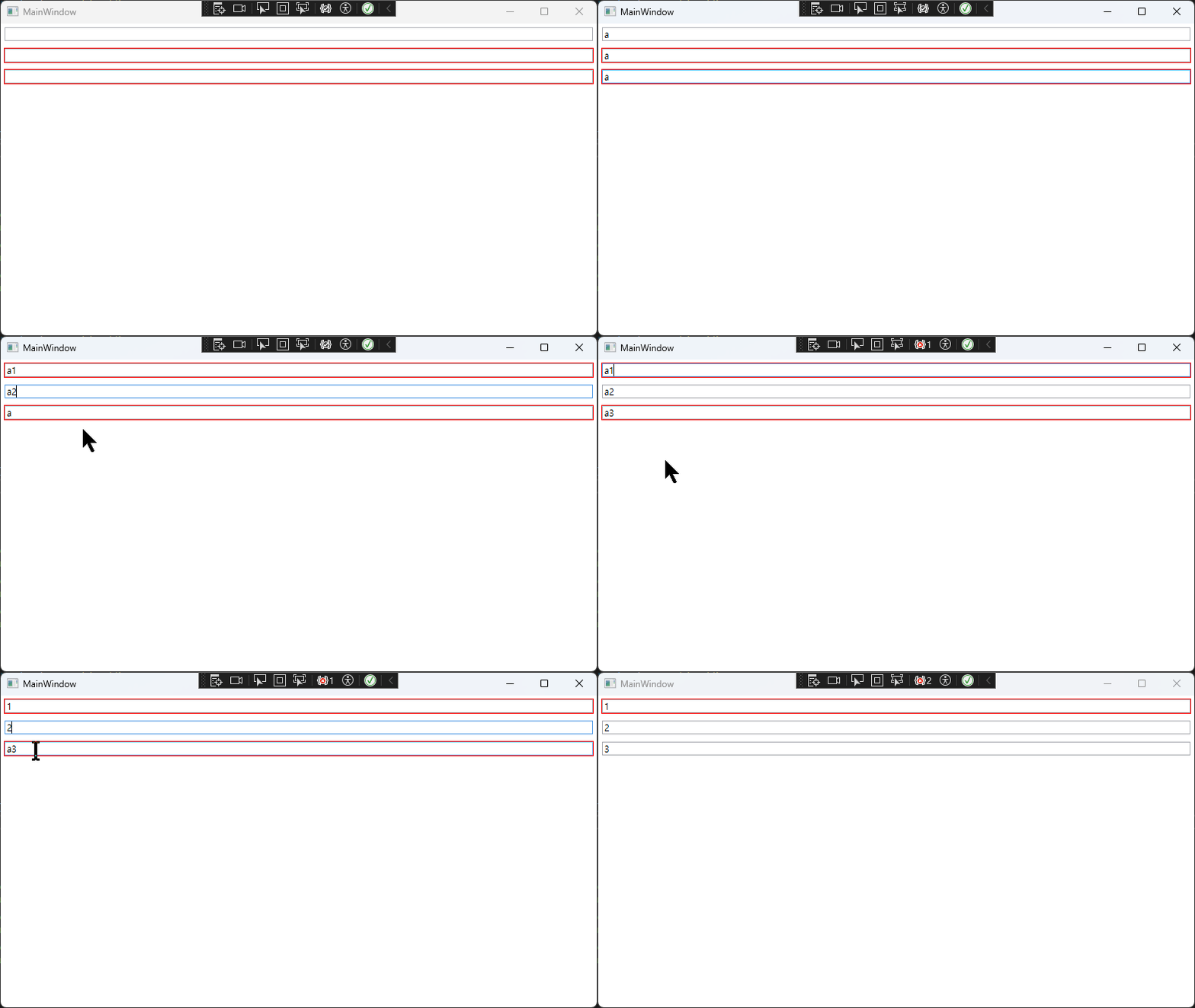
실행해서 확인해봅니다.
에러 툴팁 표시
에러를 Tooltip 형식으로 표시하고 싶으면 TextBox에선 아래와 같이 하면 된다.
<TextBox Margin="5"
         Text="{Binding InputText2, UpdateSourceTrigger=PropertyChanged, ValidatesOnNotifyDataErrors=True}">
    <TextBox.Style>
        <Style TargetType="TextBox">
            <Style.Triggers>
                <Trigger Property="Validation.HasError" Value="True">
                    <Setter Property="ToolTip">
                        <Setter.Value>
                            <ToolTip>
                                <ItemsControl ItemsSource="{Binding PlacementTarget.(Validation.Errors), RelativeSource={RelativeSource AncestorType=ToolTip}}">
                                    <ItemsControl.ItemTemplate>
                                        <DataTemplate>
                                            <TextBlock Text="{Binding ErrorContent}"/>
                                        </DataTemplate>
                                    </ItemsControl.ItemTemplate>
                                </ItemsControl>
                            </ToolTip>
                        </Setter.Value>
                    </Setter>
                </Trigger>
            </Style.Triggers>
        </Style>
    </TextBox.Style>
</TextBox>
ValidateProperty 함수도 아래와 같이 수정해야한다.
private void ValidateProperty([CallerMemberName] string? propertyName = null)
{
    // null인 경우엔 속성 모두 검증하기 위해 모두 지우기
    if (propertyName == null)
        dictErrors.Clear();
    else
    {
        // 이름이 있으면 해당 속성만 지우기
        if (dictErrors.ContainsKey(propertyName))
            dictErrors.Remove(propertyName);
    }

    // 속성 검증
    if (propertyName == null || propertyName == nameof(InputText))
    {
        if (InputText.Any(char.IsDigit))
        {
            dictErrors[nameof(InputText)] = new List<string>();
            dictErrors[nameof(InputText)].Add("숫자는 입력할 수 없습니다.");
        }
    }
    if (propertyName == null || propertyName == nameof(InputText1))
    {
        List<string> message = new List<string>();
        if (string.IsNullOrEmpty(InputText1))
            message.Add("빈 문자열은 입력될 수 없습니다.");
        if (!InputText1.Any(char.IsDigit))
            message.Add("숫자가 하나 이상 입력되어야 합니다.");
        if (0 < message.Count)
            dictErrors[nameof(InputText1)] = new List<string>(message);
    }
    if (propertyName == null || propertyName == nameof(InputText2))
    {
        List<string> message = new List<string>();
        if (string.IsNullOrEmpty(InputText2))
            message.Add("빈 문자열은 입력될 수 없습니다.");
        if (!InputText2.All(char.IsDigit))
            message.Add("숫자만 입력되어야 합니다.");
        if (0 < message.Count)
            dictErrors[nameof(InputText2)] = new List<string>(message);
    }

    // 에러가 change 됐다는 이벤트 발생
    ErrorsChanged?.Invoke(this, new DataErrorsChangedEventArgs(propertyName));
}
github: https://github.com/3001ssw/c_sharp/tree/main/WPF/WPF_Basic/WpfINotifyDataErrorInfo