![[WPF] ShowDialog, Show 새 창 띄우기, Dialog Service 만들기](https://3001ssw.com/wp-content/uploads/2026/01/blog_main_banner4.png)
C#에서 ShowDialog와 Show 함수는 Window에서 제공하는 함수로, 모달(Modal)인지 아닌지(Modaless) 차이가 있지, 두 함수 모두 새 창을 띄우는 함수입니다. 두 방식의 차이는 아래 표와 같습니다.
| 구분 | Show | ShowDialog |
|---|---|---|
| 창 종류 | Modeless | Modal |
| 다른 창 조작 | 가능 | 불가능 |
| 코드 흐름 | 즉시 다음 줄로 진행 | 창 닫힐 때까지 대기 |
| 주 사용 사례 | 여러 창을 동시에 사용할 때 | 설정/알림/확인 같은 단일 작업 창 |
View와 ViewModel을 만들고 새 창으로 띄우는 건 그렇게 어렵지 않습니다. MainViewModel에서 아래와 같은 코드를 만들면 됩니다.
UserDialogView v = new UserDialogView();
UserDialogViewModel vm = new UserDialogViewModel();
v.DataContext = vm;
v.Owner = Application.Current.MainWindow;
v.WindowStartupLocation = WindowStartupLocation.CenterOwner;
v.ShowDialog();
// v.Show();
하지만 위 코드는 ViewModel이 UI를 직접 생성하므로 UI 결합이 강해 MVVM 패턴에 위반됩니다. 그래서 View를 생성하는 것을 ViewModel이 아닌 곳에서 해주기 위해 아래와 같이 interface를 만들어줍니다.
DialogService.cs를 만들어 아래 코드들을 하나의 cs 파일에 만들어줍니다.
/// <summary>
/// ShowDialog, Show를 하기위한 Interface
/// </summary>
public interface IDialogService
{
    void Show<T>(object viewModel) where T : Window;
    bool? ShowDialog<T>(object viewModel) where T : Window;
}
IDialogService를 상속받은 DialogService 클래스도 생성해줍니다.
public class DialogService : IDialogService
{
    public void Show<T>(object viewModel) where T : Window
    {
        Window? window = Activator.CreateInstance<T>() as Window;
        if (window == null)
            throw new Exception();

        window.DataContext = viewModel;
        window.Owner = Application.Current.Windows.OfType<Window>().SingleOrDefault(x => x.IsActive);
        window.WindowStartupLocation = WindowStartupLocation.CenterOwner;
        window.ShowInTaskbar = false;

        // ViewModel이 RequestClose 이벤트 제공하면 연결
        if (viewModel is IDialogViewModel vm)
        {
            vm.RequestClose += (s, dialogResult) =>
            {
                window.Close();
            };
        }

        window.Show();
    }

    public bool? ShowDialog<T>(object viewModel) where T : Window
    {
        Window? window = Activator.CreateInstance<T>() as Window;
        if (window == null)
            throw new Exception();

        window.DataContext = viewModel;
        window.Owner = Application.Current.Windows.OfType<Window>().SingleOrDefault(x => x.IsActive);
        window.WindowStartupLocation = WindowStartupLocation.CenterOwner;
        window.ShowInTaskbar = false;

        // ViewModel이 RequestClose 이벤트 제공하면 연결
        if (viewModel is IDialogViewModel vm)
        {
            vm.RequestClose += (s, dialogResult) =>
            {
                window.DialogResult = dialogResult;
                window.Close();
            };
        }

        return window.ShowDialog();
    }
}
그 다음으로 창을 ViewModel에서 종료하기 위해 사용 될 interface도 만들어줍니다.
/// <summary>
/// Close를 하기 위한 Interface
/// </summary>
public interface IDialogViewModel
{
    event EventHandler<bool?> RequestClose;
}
그리고 MainWindow.xaml을 아래와 같이 만들어 줍니다.
<Window x:Class="WpfDialogService.MainWindow"
        xmlns="http://schemas.microsoft.com/winfx/2006/xaml/presentation"
        xmlns:x="http://schemas.microsoft.com/winfx/2006/xaml"
        xmlns:d="http://schemas.microsoft.com/expression/blend/2008"
        xmlns:mc="http://schemas.openxmlformats.org/markup-compatibility/2006"
        xmlns:local="clr-namespace:WpfDialogService"
        mc:Ignorable="d"
        Title="MainWindow"
        Height="450"
        Width="800">
    <StackPanel Margin="10">
        <Button Content="Not MVVM Pattern Show Dialog"
                Margin="5"
                Command="{Binding NotMVVMCommand}"/>
        <Button Content="ShowDialog T"
                Margin="5"
                Command="{Binding ShowDialogCommand}"/>
        <Button Content="Show T"
                Margin="5"
                Command="{Binding ShowCommand}"/>
    </StackPanel>
</Window>
MainWindow.xaml.cs에도 아래와 같이 코딩해줍니다.
namespace WpfDialogService
{
    /// <summary>
    /// Interaction logic for MainWindow.xaml
    /// </summary>
    public partial class MainWindow : Window
    {
        public MainWindow()
        {
            InitializeComponent();
            DataContext = new MainViewModel(new DialogService());
        }
    }
}
MainViewModel.cs를 만들어 아래와 같이 코딩해줍니다.
namespace WpfDialogService
{
    public class MainViewModel : BindableBase
    {
        private readonly IDialogService _dialogService;
        public DelegateCommand NotMVVMCommand { get; }
        public DelegateCommand ShowDialogCommand { get; }
        public DelegateCommand ShowCommand { get; }

        public MainViewModel(IDialogService dialogService)
        {
            _dialogService = dialogService;
            NotMVVMCommand = new DelegateCommand(OnNotMVVM);
            ShowDialogCommand = new DelegateCommand(OnShowDialog);
            ShowCommand = new DelegateCommand(OnShow);
        }

        private void OnNotMVVM()
        {
            UserDialogView v = new UserDialogView();
            UserDialogViewModel vm = new UserDialogViewModel();
            v.DataContext = vm;
            v.Owner = Application.Current.MainWindow;
            v.WindowStartupLocation = WindowStartupLocation.CenterOwner;
            v.ShowDialog();
        }

        private void OnShowDialog()
        {
            var dialog = new DialogService();
            var vm = new UserDialogViewModel();

            bool? result = _dialogService.ShowDialog<UserDialogView>(vm);
            Debug.WriteLine($"result: {result}");
        }

        private void OnShow()
        {
            var vm = new UserDialogViewModel();

            _dialogService.Show<UserDialogView>(vm);
        }
    }
}
UserDialogView.xaml와 UserDialogViewModel.cs도 만들어줍니다.
<Window x:Class="WpfDialogService.UserDialogView"
        xmlns="http://schemas.microsoft.com/winfx/2006/xaml/presentation"
        xmlns:x="http://schemas.microsoft.com/winfx/2006/xaml"
        xmlns:d="http://schemas.microsoft.com/expression/blend/2008"
        xmlns:mc="http://schemas.openxmlformats.org/markup-compatibility/2006"
        xmlns:local="clr-namespace:WpfDialogService"
        mc:Ignorable="d"
        Title="UserDialogView"
        Height="300"
        Width="300">
    <Window.InputBindings>
        <KeyBinding Key="Esc"
                    Command="{Binding CancelCommand}"/>
    </Window.InputBindings>
    <StackPanel Margin="20">
        <Button Content="OK"
                Command="{Binding OkCommand}"/>
        <Button Content="Cancel"
                Command="{Binding CancelCommand}"
                Margin="0,10,0,0"/>
    </StackPanel>
</Window>
namespace WpfDialogService
{
    public class UserDialogViewModel : BindableBase, IDialogViewModel
    {
        public event EventHandler<bool?>? RequestClose;

        public ICommand OkCommand { get; }
        public ICommand CancelCommand { get; }

        public UserDialogViewModel()
        {
            OkCommand = new DelegateCommand(() => RequestClose?.Invoke(this, true));

            CancelCommand = new DelegateCommand(() => RequestClose?.Invoke(this, false));
        }
    }
}
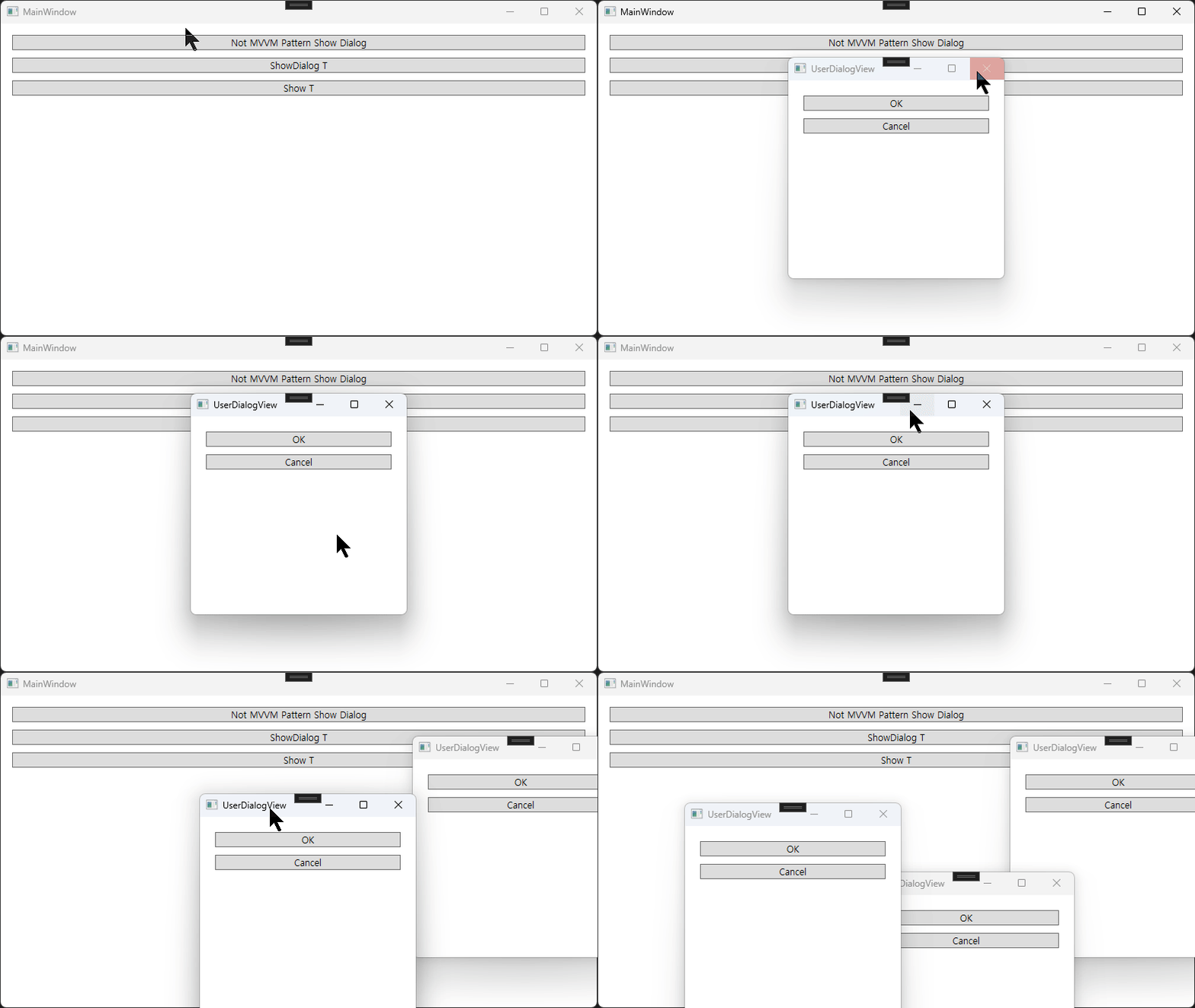
실행 시켜 확인해봅니다.
github : https://github.com/3001ssw/c_sharp/tree/main/WPF/WPF_Basic/WpfDialogService